
Handling negotiable salary in Google Jobs schema is a common challenge for JobWP users. Many employers prefer not to display a fixed salary on job listings — they’d rather negotiate based on the candidate’s experience. However, Google’s JobPosting structured data has strict rules about salary values that prevent you from simply typing “Negotiable” into the salary field.
This guide explains why the error happens and gives you two clean solutions that satisfy both Google’s schema requirements and your candidates’ need to know the salary is negotiable.
Why “Negotiable” Causes a Google Schema Error #
JobWP automatically generates Google JobPosting structured data for every listing. This schema tells Google exactly what type of content your page contains — including job title, location, employment type, and salary.
Google’s schema specification requires the baseSalary field to contain a numeric value. When you type “Negotiable”, “TBD”, or “Competitive” into the salary field, JobWP passes that text directly into the schema code — which Google’s validator rejects as an error.
The good news is that Google treats salary as an optional field. You have two clean ways to handle this.
The Solution — Split Your Approach #
The key is to separate what humans see from what Google reads in the schema. Here’s how:
Step 1 — Tell Candidates the Salary is Negotiable (Human Layer) #
Put the negotiable salary information directly inside your job description — not the salary field. Google reads the description as standard HTML text and displays it to candidates without any schema validation issues.
Example:
We are looking for a skilled developer to join our growing team.

Salary is negotiable based on experience.
This way candidates clearly understand the salary is open to discussion, while Google never sees “Negotiable” in a field that requires a number.
Step 2 — Choose One of Two Schema Options (Technical Layer) #
For the actual salary field in JobWP, choose one of these two options:
Option A — Leave the salary field blank (recommended)
Simply leave the JobWP salary field empty. When no salary value is entered, JobWP omits the baseSalary property from the schema entirely. Google treats this as a valid listing — jobs without salary still appear in Google Jobs results, just without a salary figure displayed.
This is the cleanest approach and carries zero risk of schema errors.
Option B — Enter your internal budget range
If you want the potential SEO ranking benefit of including a salary in your schema, enter your internal budget range in the salary field — for example 50000 – 80000.
Job seekers will see the range displayed on the listing, and you can still negotiate within or around that range during interviews. This gives Google a valid numeric value while keeping your actual offer flexible.
Which Option Should You Choose? #
| Situation | Recommended option |
|---|---|
| You have no budget range in mind | Option A — leave blank |
| You want maximum schema compliance and simplicity | Option A — leave blank |
| You want salary to appear in Google Jobs results | Option B — enter budget range |
| You have an internal budget but prefer not to publish it | Option A — leave blank |
Verifying Your Schema is Error-Free #
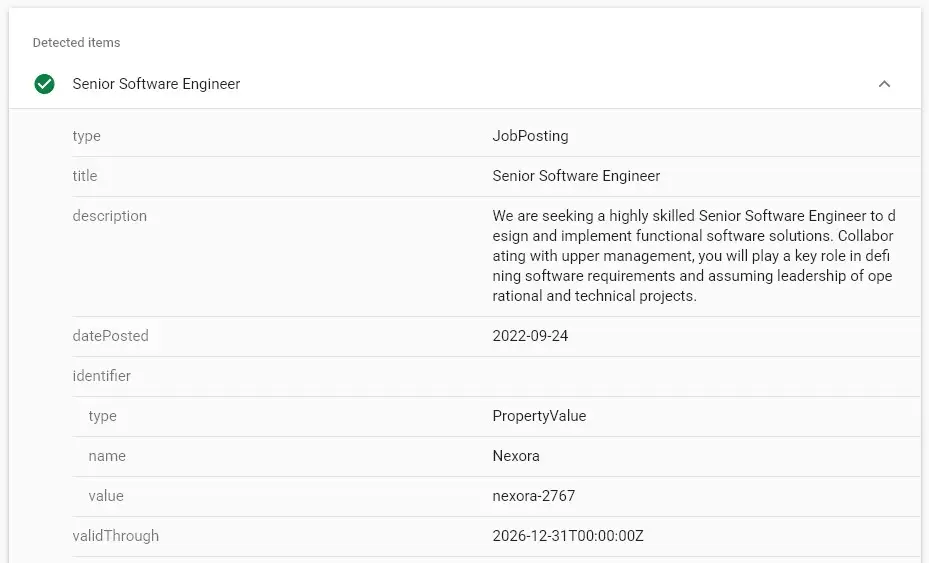
After making your changes, test your job listing in Google’s Rich Results Test:
https://search.google.com/test/rich-results
Enter your job listing URL and check for any salary-related warnings. A green tick with no errors means Google will index your listing correctly.
Quick Summary #
❌ Never type “Negotiable”, “TBD”, or “Competitive” in the salary field — handling negotiable salary in Google Jobs schema requires a numeric value or an empty field
✅ Put negotiable salary information in the job description for candidates
✅ Either leave the salary field blank (Option A) or enter a numeric budget range (Option B)
✅ Test with Google Rich Results Test to confirm no errors
 Download JobWP free on WordPress.org → wordpress.org/plugins/jobwp
 View live demo → wpjoblisting.com/demo
 Explore Pro plans from $49.99/year → wpjoblisting.com/pricing-faq


